

Sit-Stand Desk Installation in Los Angeles: A Multi-Desk Checklist
Planning ergonomic office furniture installation in Los Angeles? A group of height-adjustable desks needs more than an assembly date. Each station must connect the correct base, work surface, controls and accessories with the approved layout and a clear handoff for power and technology. Use this checklist to prepare a commercial sit-stand desk rollout before delivery.
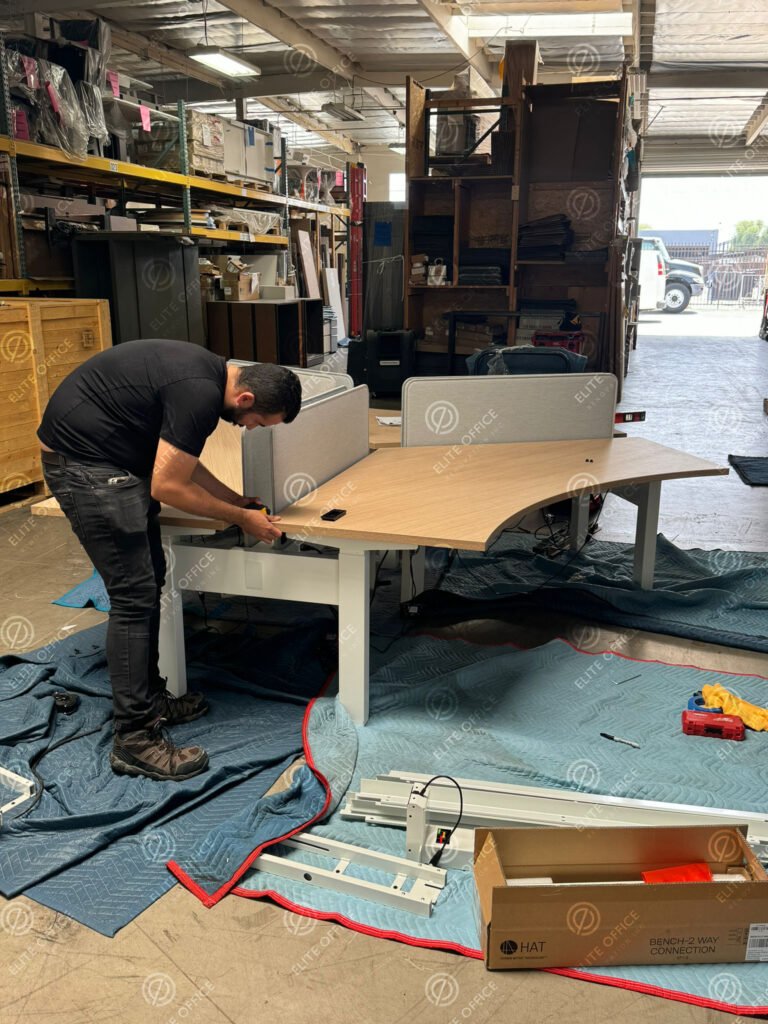
Confirm the desk model and the installation documents
Create a product schedule that lists the manufacturer, model, work-surface size, base configuration and quantity of each desk type. Include the control option and accessories supplied with the order. A rectangular top and two lifting legs do not establish that every component in a mixed shipment belongs together.
Give the installation team the current assembly and operating documents for the actual product. For example, Herman Miller’s product instruction library allows searches by product or instruction number. Use the documents applicable to your order rather than a visually similar desk. Identify who will resolve a missing or incompatible item before installation day.
Inventory complete desk kits, not only tabletops
Match every station on the layout to its components. Keep hardware and small parts associated with the correct model and workstation identifier. Record uncertain items as unresolved so the crew can distinguish a complete kit from a collection of boxes.
- Base and structureCorrect legs, feet, frame members and model-specific fasteners.
- Work surfaceApproved size, orientation, mounting information and visible condition.
- Controls and connectionsThe specified controller, control unit, connecting cables and supplied power cord.
- AccessoriesScreens, monitor arms, trays and storage included in the approved scope.
- Product documentsAssembly instructions, operating guide and any required setup procedure.
- Station identificationA shared desk number on the plan, delivery inventory and completion record.
Ask the supplier how shortages and damaged parts will be reported and replaced. Confirm whether replacement deliveries or return visits are included in the proposal. These decisions affect the sequence even when the main furniture shipment has arrived.
Review the layout for both sitting and standing positions
A height-adjustable desk changes position during use. Review the proposed arrangement with the furniture documentation and the parties responsible for the workspace. Consider adjacent storage, partitions, shelves, monitor arms and other items that could conflict with the desk or its equipment as the surface moves.
Plan cable routing with the responsible IT and electrical providers. Ask how the required movement will be accommodated without relying on a tightly stretched cable or an improvised extension arrangement. Confirm equipment locations and the applicable product instructions before finalizing accessories.
OSHA’s workstation desk guidance identifies work-surface space and clearance underneath the desk as relevant setup considerations. Include those areas in the project review, alongside the product-specific movement requirements.
For the Los Angeles building, confirm the loading location, freight-elevator reservation, authorized handling route and staging area. Compare delivery packaging with access conditions before dispatch. The general office furniture installation checklist covers the wider site-readiness review.
Separate furniture installation, technology and electrical work
A useful proposal names the party responsible for each task. Confirm these handoffs together so one team’s completion does not leave another team waiting for access, equipment or approval.
Also identify who approves station locations, releases work areas and signs off unresolved items. For a phased project, record the handoff by department or station group instead of marking the entire office complete at once.
Plan a repeatable sequence for an occupied office
When employees remain in the building, agree on which desk group is released first, where incoming components will be staged and when IT can reconnect equipment. Employees should remove personal items and documents according to the business’s procedures before their furniture is handled.
Use an agreed first station or small group to confirm the layout, accessory arrangement and completion checklist before repeating the setup across the office. Product-specific exceptions should be documented so the crew does not carry an incorrect assumption into every station.
As a planning example, a business may replace desks one department at a time while other teams remain active. That sequence requires a release time, installation window and technology handoff for each group. It is an illustrative scenario, not a description of an Elite project or a guaranteed completion schedule. If existing furniture must move first, review the office reconfiguration scope alongside the new installation.
Agree on product setup and the final walkthrough
Ask the installation team to follow the applicable manufacturer setup process and record any incomplete station. For example, the Renew sit-to-stand operating guide specifies calibration at installation. This is a product-specific example; the correct procedure for another desk comes from that product’s documentation.
- Confirm station numbers, desk orientation and accessory placement against the approved plan.
- Review leveling, visible condition and hardware checks included in the installation scope.
- Confirm the specified operating and movement checks with the responsible provider.
- Review cable routing, nearby objects and equipment arrangements with the relevant teams.
- Record missing components, incomplete setup or damaged items with an owner and next action.
- Provide the operating guide and identify who will assist employees with later setup questions.
Separate furniture acceptance from technology sign-off and any employee-specific workstation assessment. Agree on who completes each review rather than assuming one walkthrough covers every responsibility.
What to send for a Los Angeles sit-stand desk installation estimate
Prepare the product schedule, quantities, installation documents, approved layout, accessory list and commercial project address. Add delivery status, building access rules, staging constraints, occupied-office requirements and preferred dates. State whether existing desks need disassembly or relocation and who handles IT and electrical work.
Request an estimate based on those details. A universal per-desk price cannot account for different models, accessories, access routes and project phases. Our office furniture installation cost guide explains the broader scope factors.
Elite Office Renovation provides commercial office furniture installation in Los Angeles. Share your desk models and project information so the team can review the required installation scope and next steps.
Sit-stand desk installation FAQs
Clarify the scope before reserving your commercial installation window.
Does delivery include sit-stand desk installation?
Confirm this in writing with the supplier and installer. Receiving boxes, distributing components, assembling desks, fitting accessories and completing product setup are separate tasks that may be assigned to different providers.
How long does a multi-desk installation take?
Timing depends on the product, component readiness, station count, accessories, access and work phases. Ask for a schedule based on the actual inventory and building arrangements rather than a universal time per desk.
Does furniture installation include an ergonomic assessment?
Confirm any assessment separately. Furniture assembly and manufacturer-required setup do not establish that every employee has received an individual workstation assessment. Name the responsible workplace specialist or provider where that review is needed.
Product and workstation resources
Reviewed October 19, 2026. Product instructions apply to the specified manufacturer and model.
Plan your office desk installation
Send your furniture list, desk models, layout, project address and preferred schedule for a commercial installation review.